Creating Vector Search with TiDB Serverless and Drizzle

Vector Search has become highly popular with RAG Systems. In this blog we will learn how we can use the TiDB serverless library to connect with our Database, create schema in drizzle, and use the vector search ability of the build in vector search in TiDB. But We should learn what is vector search and how it works?
Vector Search
Vector Search return similar items based on their semantic meaning, rather than exact matches. This is different from traditional keyword-based searches.
Traditional Search works like:
query: King results: King, Kingbird, Kingcup, Kingdom
Vector Search Example:
query: King
results: King, Queen, Kingdom, Monarch, Ruler, Prince
Vector Search in TiDB

Here a diagram explaining vector search by TiDB. https://docs.pingcap.com/tidbcloud/vector-search-overview/?plan=starter
- Vector type in TiDB
When creating a table, you can define a column as a vector column by specifying the VECTOR data type.
example
USE test;
CREATE TABLE embedded_documents (
    id        INT       PRIMARY KEY,
    -- Column to store the original content of the document.
    document  TEXT,
    -- Column to store the vector representation of the document.
    embedding VECTOR(3)
);
Inserting:
INSERT INTO embedded_documents
VALUES
    (1, 'dog', '[1,2,1]'),
    (2, 'fish', '[1,2,4]'),
    (3, 'tree', '[1,0,0]');
Querying :
SELECT * FROM embedded_documents;
Output:
+----+----------+-----------+
| id | document | embedding |
+----+----------+-----------+
|  1 | dog      | [1,2,1]   |
|  2 | fish     | [1,2,4]   |
|  3 | tree     | [1,0,0]   |
+----+----------+-----------+
3 rows in set (0.15 sec)
Vector Search
SELECT id, document, vec_cosine_distance(embedding, '[1,2,3]') AS distance
FROM embedded_documents
ORDER BY distance
LIMIT 3;
Output from vector search
+----+----------+---------------------+
| id | document | distance            |
+----+----------+---------------------+
|  2 | fish     | 0.00853986601633272 |
|  1 | dog      | 0.12712843905603044 |
|  3 | tree     |  0.7327387580875756 |
+----+----------+---------------------+
3 rows in set (0.15 sec)
Now, you would have a lot of question. Why did we only chose vector size of 3 ? How to convert text to vectors/embeddings? What is vec_cosine_distance for querying TiDB Database ? Does the Query vector has to be the same size as that of stored in database?
How vector search is calculated ?

Let’s take a look at how vector search typically work:
1.Vector embeddings generation: Data items are first converted into vectors using a feature extraction or embedding technique. For example, images can be represented as vectors using convolutional neural networks (CNNs), and text documents can be represented as vectors using word embeddings or sentence embeddings.
2. Indexing & querying: The vectors are then indexed in the vector search database. Indexing is the process of organizing the vectors in a way that allows for efficient similarity search. Various indexing techniques and data structures, such as k-d trees, ball trees, and approximate nearest neighbor (ANN) algorithms, can be used to speed up the search process.
For text data, embeddings can be created using methods such as Word2Vec, GloVe or BERT. These methods create vector representations of words, phrases, or sentences based on the semantic and syntactic relationships between them. The embeddings are typically generated by training neural network models on large collections of text. Some popular methods for creating text embeddings include:
Bag-of-words (BoW) model
Word embeddings (Word2Vec, GloVe)
Pre-trained language models (BERT, GPT)
How indexing and querying works
Vector search finds similar data using approximate nearing neighbor (ANN) algorithms. Compared to traditional keyword search, vector search yields more relevant results and executes faster.
Approximate Nearest Neighbors (ANN) is a class of algorithms used to find the nearest neighbors of a query point in a high-dimensional dataset. These algorithms are called "approximate" because they trade off a small amount of accuracy for a significant speedup compared to exact nearest neighbor search algorithms. ANN algorithms are commonly used in applications such as recommendation systems, image retrieval, natural language processing, and more.
Cosine Similarity
We use the term “cosine similarity” or “cosine distance” to denote the difference between the orientation of two vectors. For example, how far would you turn to face the front door?
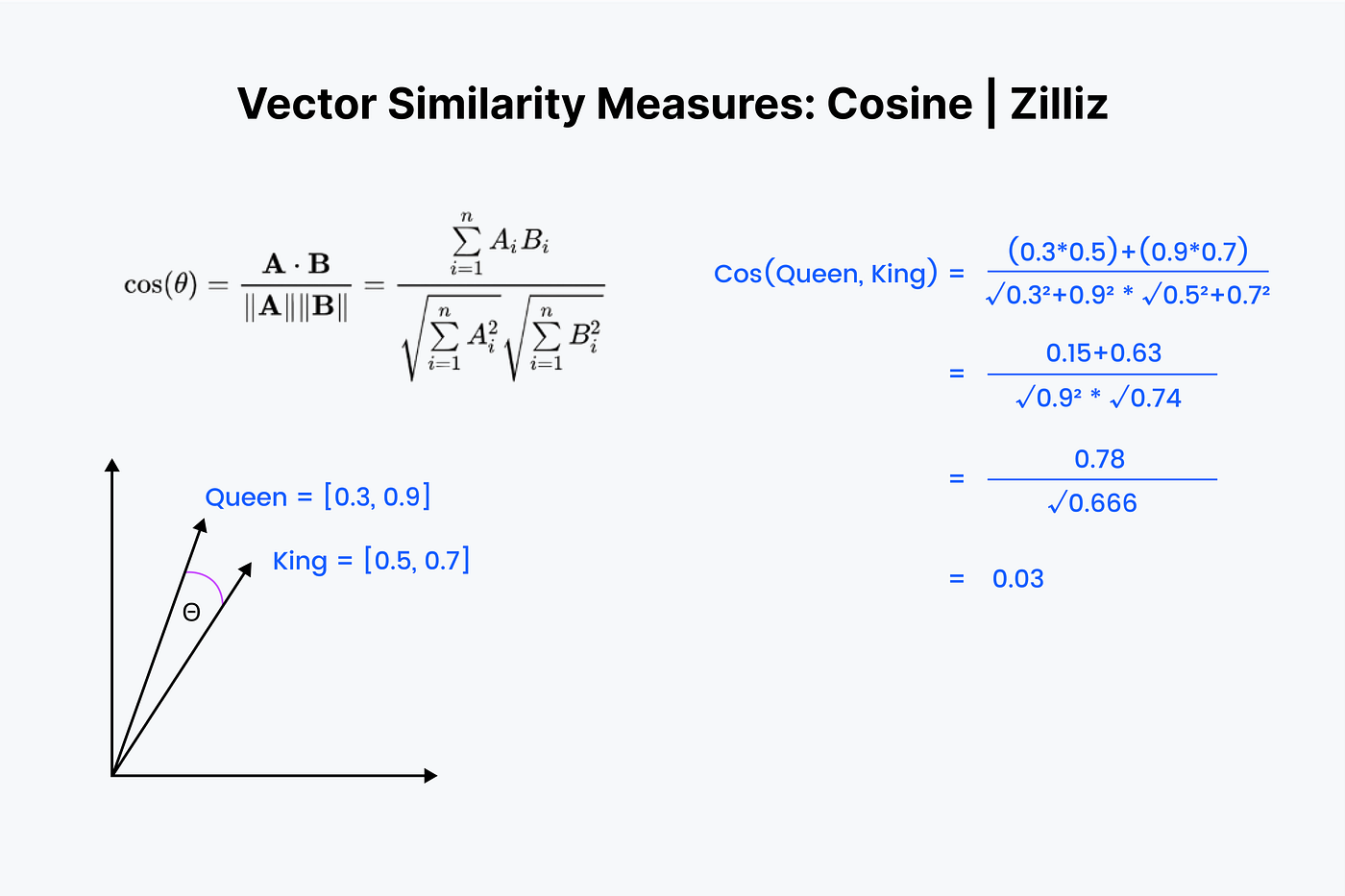
We begin by lining the vectors on top of each other again. Start by multiplying the numbers down and then adding all of the results up. Now save that number; call it “x”. Next, we must square each number and add the numbers in each vector. Imagine squaring each number horizontally and adding them together for both vectors.
How does Vector Search helps in RAG System ?
Vector Search becomes a key component of the knowledge base in a RAG System.
RAG with Vector Search
Ingest documents → Break into chunks → Convert to embeddings → Store in a Vector Database (like TiDB Vector, etc.).
User Query → Embed into vector.
Vector Search → Retrieve top-k similar chunks.
Pass retrieved chunks + query → LLM → Generate grounded, accurate response.
Using Vector Search with drizzle and TiDB
Create a Custom Vector Type
import { sql } from "drizzle-orm";

import { mysqlTable, varchar, text, float, timestamp, int, customType } from "drizzle-orm/mysql-core";

export const vector = customType<{
    data: number[];
    config: { length: number };
    configRequired: true;
    driverData: string;
}>({
    dataType(config) {
        return `VECTOR(${config.length})`;
    },
    toDriver(value: number[]) {
        // TiDB expects `[x,y,z]`
        return `[${value.join(",")}]`;
    },
    fromDriver(value: string) {
        // TiDB returns "[0.1,0.2,...]"
        try {
            return JSON.parse(value) as number[];
        } catch {
            return value
                .replace(/^\\[|\\]$/g, "")
                .split(",")
                .map(Number);
        }
    },
});
Let’s Create a Media Chunks Table. As you can see we can only create vector of specific sizes. The usual process is to use a text Clunker/splitter that would create small vector chunks for the document uploaded.
export const mediaChunks = mysqlTable("media_chunks", {
    id: varchar("id", { length: 36 })
        .primaryKey()
        .default(sql`(UUID())`), // use MySQL's UUID()

    mediaId: varchar("media_id", { length: 36 })
        .notNull()
        .references(() => media.id, { onDelete: "cascade" }),
    chunk: text("chunk").notNull(),
    embedding: vector("embedding", { length: 768 }).notNull(),
    order: int("order").notNull(),
})
We will create a media table.
 export const media = mysqlTable("media", {
    id: varchar("id", { length: 36 })
        .primaryKey()
        .default(sql`(UUID())`), // use MySQL's UUID()
    title: text("title").notNull(),
    fileUrl: text("file_url").notNull(),
    type: varchar("type", { length: 50 }), // pdf, image, doc
    size: float("size").notNull(), // in MB
    createdAt: timestamp("created_at")
        .default(sql`CURRENT_TIMESTAMP`)
        .notNull(),
});
Let’s Connect drizzle with TiDB
import { serverOnly } from "@tanstack/react-start";
import { drizzle } from "drizzle-orm/tidb-serverless";

import * as schema from "~/lib/db/schema";

const getDatabase = serverOnly(() =>
  drizzle({
    connection: { url: process.env.DATABASE_URL },
    schema,
  }));

export const db = getDatabase();
Now, Let’s Create an upload api that would upload the component to CMS provider, use the text splitter to create chunks.
Example of api route
// getting the text from the website, you can use pdf as well
const url = "<https://coolhead.in>";

// we will use the reaper api by jina.ai to get the content from the website
const result = await fetch(`https://r.jina.ai/${url}`);

const content = await result.text();  //<--- Content

//Chunking
const segmentsResult = await fetch(`https://segment.jina.ai`, {
  method: "POST",
  headers: {
    Authorization: `Bearer ${process.env.JINA_API_KEY}`,
    "Content-Type": "application/json",
  },
  body: JSON.stringify({
    content,
    return_tokens: true,
    return_chunks: true,
    max_chunk_length: 1000,
  }),
});

//Now we will create small chunks content for the

 const segmentsData =
    (await segmentsResult.json()) as JinaSegmenterResponse;

// Creating Embeddings of size 768

const embeddingsResult = await fetch(
  "<https://api.jina.ai/v1/embeddings>",
  {
    method: "POST",
    headers: {
      Authorization: `Bearer ${process.env.JINA_API_KEY}`,
      "Content-Type": "application/json",
    },
    body: JSON.stringify({
      model: "jina-embeddings-v3",
      task: "retrieval.passage",
      late_chunking: true,
      dimensions: 768,
      embedding_type: "float",
      input: segmentsData.chunks,
    }),
  },
);

// Save the Embedding the data to out TiDB database.
const embeddingsData =
  (await embeddingsResult.json()) as JinaEmbeddingsResponse;

const mediaId = "9203fd63-869b-11f0-bb4b-9ee057d67487" // already present in the media table

const values = embeddingsData.data.map((embedding, index) => ({
  mediaId,
  chunk: segmentsData.chunks[embedding.index],
  embedding: embedding.embedding,
  order: index,
}));

await db.insert(mediaChunks).values(values);  //<---- return this from api
Querying: Create an vector embeddings for the query . Then use vector cosine search to get the required Chunks of the document.
//get the query from the request
const body = await request.json();
const { query } = body as { query: string };

//Create embeddings for the query

const embeddingsResult = await fetch("<https://api.jina.ai/v1/embeddings>", {
  method: "POST",
  headers: {
    Authorization: `Bearer ${process.env.JINA_API_KEY}`,
    "Content-Type": "application/json",
  },
  body: JSON.stringify({
    model: "jina-embeddings-v3",
    task: "retrieval.query",
    dimensions: 768,
    embedding_type: "float",
    input: [query],
  }),
});

const embeddingsData = await embeddingsResult.json();
const queryEmbedding = embeddingsData.data[0].embedding as number[];

const embeddingLiteral = [JSON.stringify(queryEmbedding)]

const embeddingLiteral = [JSON.stringify(queryEmbedding)]

  const { rows } = await db.execute(
    sql/*sql*/`
  SELECT
    id,
    media_id,
    chunk,
    \\`order\\`,
    vec_cosine_distance(
      embedding,
      ${embeddingLiteral}
    ) AS distance
  FROM ${mediaChunks}
  ORDER BY distance
  LIMIT 5
`
  );

const chunks = rows?.map((r) => r.chunk).join("\\n\\n");

// use the chunks and give to LLM to generate an response to the query.
const { text } = await generateText({
  model,

  prompt: query,
  system: `You are an question answer assistant.
Context:\\n${chunks}\\n\\n
`,
});
There are other Vector distance functions as well in TiDB. I would suggest you to try other as well. Learn More about TiDB Vector Functions.

This code was taken from my RAG FamCare. FamCare shows how RAG + vector search can turn raw medical data into actionable, context-aware insights and create medicine Scheduling all powered by AI. If you’d like to explore the code, experiment, or even extend it with your own ideas, head over to the GitHub repo and give it a ⭐️.