Improve Your Website Web Vitals

Core Web Vitals metrics →
Largest Contentful Paint → Frist
Improving the Largest Contentful Paint (LCP) metric. Using a CDN reduces server response times, minimizing third-party scripts lowers JavaScript execution delays, optimizing images and videos enhances their load speed, and reducing HTTP requests overall boosts performance, making them all essential for better web loading efficiency.
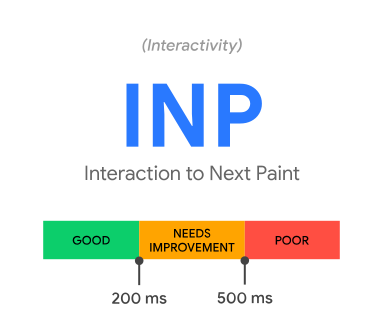
INP → interaction to next paint

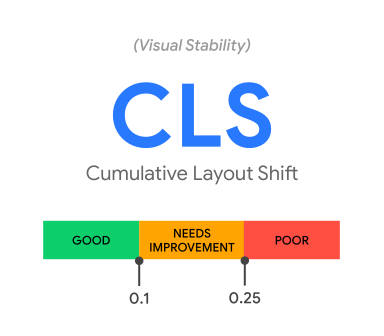
Cumulative Layout Shift → Visual Stabillity on a website, Font Change

Good Blogs on web performance →
https://bloggingwizard.com/page-load-time-statistics/#:~:text=“At the BBC we've,20.7 million users lost%2Fmonth
https://www.fastcompany.com/1825005/how-one-second-could-cost-amazon-16-billion-sales
Google Web Vitals
Web Vitals | Articles | web.dev
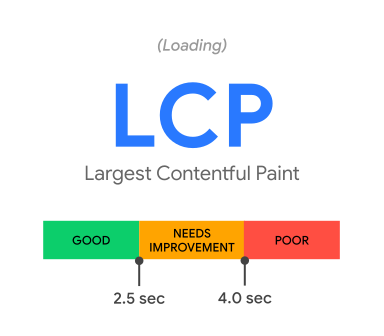
Largest Contentful Paint (LCP): measures loading performance. To provide a good user experience, LCP should occur within 2.5 seconds of when the page first starts loading.
Interaction to Next Paint (INP): measures interactivity. To provide a good user experience, pages should have a INP of 200 milliseconds or less.
Cumulative Layout Shift (CLS): measures visual stability. To provide a good user experience, pages should maintain a CLS of 0.1. or less.
What is TBT?
The Total Blocking Time (TBT) metric measures the total amount of time after First Contentful Paint (FCP) where the main thread was blocked for long enough to prevent input responsiveness.
By default, Lighthouse stops monitoring TBT after Time to Interactive (TTI), as do some other lab tools that measure page load. See How does TBT relate to TTI?.
The main thread is considered "blocked" any time there's a Long Task a task that runs on the main thread for more than 50 milliseconds. We say the main thread is "blocked" because the browser cannot interrupt a task that's in progress. So in the event that a user does interact with the page in the middle of a long task, the browser must wait for the task to finish before it can respond.
Optimising Javascript
Minification and Compression - Webpack/ Vite, Gzip
Javascript File Loading → Script tag, defer, async
Loops and iterations Optimisation → use forEach, map or reduce
Dom manipulation optimizations → minimise dom operations, use document fragments
https://developer.mozilla.org/en-US/docs/Web/API/Document/createDocumentFragment
User Request Animation Frame → We can batch multiple dom update into one update
Event Delegation → Event Bubbling to the parent element to reduce the no. of event listeners
Use JS libraries and Frameworks → react, vue, and angular
Optimizing CSS
Minification and Compression → Webpack/Vite,
Opimizing Images →
Image Type → Vector graphics
Tools →
CDNS → 40 to 80 % image size delivery optimization
<aside> 💡
Lazy Loading →
</aside>
Tips →
Reduce IFrames
Use Preload attribute
Avoid Inline styles
reduce cookies size → maximum 20
page size → 1500KB
minimise http requests → Like graphql
Use PWA
Tips to improve your Chrome Core Vitals →
Chrome Dev Tools Performance Tab →
Server Side Bottlenecks →
Common issues →
inefficient database queries
slow third-party services → payment gateways,
insufficient hardware
server-side code
not-caching, not proper caching
Db optimization →
Database Index → for data retrieval
Denormalisation
Materialised Views →
Partitioning
Connection Pooling
Minimise Join operations
Optimise where clauses
Use Pagination
Regular Database Updates
Query Execution Plan →
Detailed a blueprint the step and operations take plan to execute the query .
https://pganalyze.com/docs/explain/basics-of-postgres-query-planning
NOSQL database optimization →
Indexes allow the database to quickly locate and retrieve data.
Third Party services →
Message Queue → Kafka, RabbitMQ
Connection Polling
Caching
Backup integrations
Caching →
Memcached
Memcached is an open source in-memory caching system designed for high performance and distributed environments.
Redis
Redis is an in-memory data structure store that can function as both a database and a cache.
It offers a rich set of data structures and supports advanced caching features such as data exploration,publishing and messaging, subscription and persistence options.
Both Memcached and Redis offer mechanisms for cache invalidation, such as setting time based expiration
Cache Invalidation
- Resources → https://redis.io/solutions/caching/
Microservices →
Modular, Deployment, Scalability,
Service Mesh → Istio, Linkered, and Consul
Algo Complexity →
- Check the Algo Complexity in your code
Profiling →
CPU Usage
Memory Usage
Event Loop Delay ms
Resources
https://www.npmjs.com/package/clinic
clinic doctor -- node main.jsThis Generates an HTML file report
https://learn.microsoft.com/en-us/visualstudio/profiling/profiling-feature-tour?view=visualstudio
Server Side Implementation
Data Types
Simple code
Use better Data structures
Performance Testing
Resources
https://en.wikipedia.org/wiki/RAID
Network Stack →
traceroute yourwebsite.com
- f5.com/products/nginx → nginx Loadbalancing
Performance Monitoring and Planning Improvements →
https://www.npmjs.com/package/web-vitals
https://www.npmjs.com/package/node-os-utils
Database Monitoring → Queries/sec, Throughput, Compute Time, connection counts, storage usage, query time execution ,
Monitoring tools →
Prometheus
Grafana → dashboards
Datadog → Cloud based analytics
New Relic
Elastic → Search
Kibana
Notifications →
Set Alerts for monitoring performance issues, decrease downtimes, SLA Compliance,
Set Grafana with Promethesus with alert rules